Files26
| .cargo | give the gate real git, no keychain helper, and no suite it already ran | 11 days ago | |
| .github | Merge branch 'main' into worktree-demo | last month | |
| crates | Answer browser icon probes without a credential challenge | 6 days ago | |
| demo | close the take with a scorecard: what was measured, a bigger day estimated, the short version | last month | |
| docs | give the README a face: a hero and two figures in the node's own palette | 11 days ago | |
| scripts | docs: choirctl is the ssh hop; every operator step names its choir form | last month | |
| templates | Merge branch 'main' into worktree-demo | last month | |
| theme | paint the tool pages on the first frame, and rest the panes on the page | 11 days ago | |
| .gitignore | Merge branch 'main' into worktree-demo | last month | 2.1 KiB |
| AGENTS.md | Merge branch 'main' into worktree-demo | last month | 11.4 KiB |
| CONTRIBUTING.md | Merge branch 'main' into worktree-demo | last month | 5.1 KiB |
| Cargo.lock | bump rustls to 0.23.45 for RUSTSEC-2026-0285 | 11 days ago | 78.8 KiB |
| Cargo.toml | keep the dist step fragment out of the workflows directory | last month | 10.3 KiB |
| DECISIONS.md | stop the palette summoning a password box, and dim the page properly | last month | 79.6 KiB |
| Dockerfile | Merge branch 'main' into worktree-first-run | last month | 5.3 KiB |
| ERRORS.md | Merge branch 'main' into worktree-demo | last month | 8.7 KiB |
| LICENSE-APACHE | name the copyright holder and attribute what is not ours | last month | 10.6 KiB |
| LICENSE-MIT | name the copyright holder and attribute what is not ours | last month | 1.0 KiB |
| NOTICE | keep a hosted repo's name out of the platform that hosts it | last month | 1.1 KiB |
| README.md | show a README's own pictures, from a route that serves nothing else | 11 days ago | 10.4 KiB |
| SECURITY.md | cut the prose out of every hand-written document | last month | 2.7 KiB |
| SYNC.md | give the operator's last four steps to choir: seed, node upgrade, backup take, followers | last month | 13.3 KiB |
| book.toml | merge worktree-documentation, and move D61's page to where its material now lives | last month | 1.8 KiB |
| choirctl | serve the binaries that install this node (D79) | last month | 32.4 KiB |
| gate | give the gate real git, no keychain helper, and no suite it already ran | 11 days ago | 45.6 KiB |
| rust-toolchain.toml | pin the toolchain the gate was already assumed to run on | last month | 723 B |
README.md
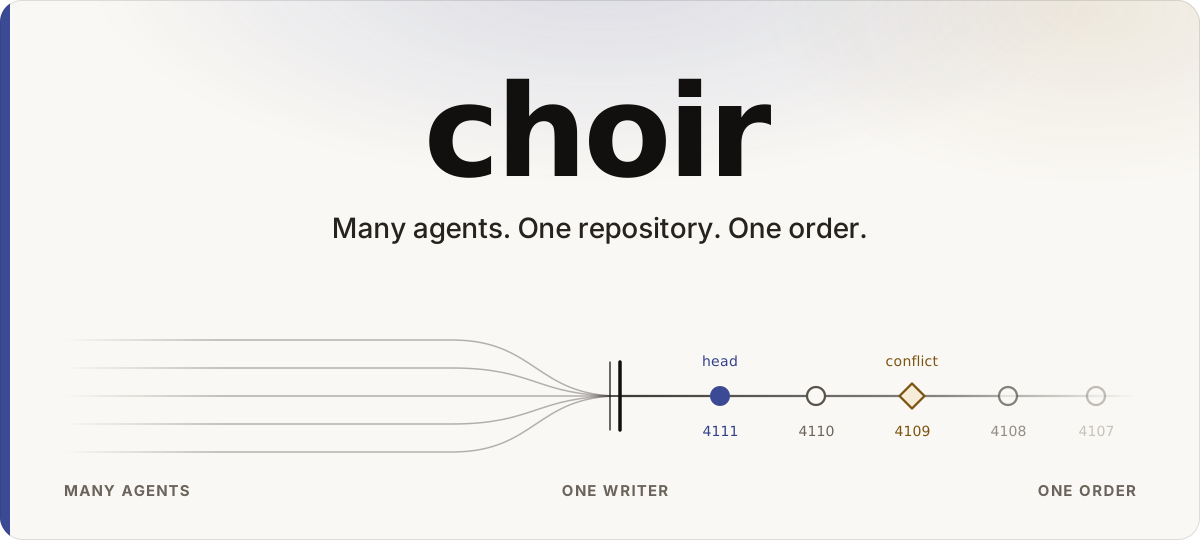
Agent-first code collaboration. Many agents on one repository, one total order from a single-writer sequencer, merge conflicts as first-class values.
Why · Quick start · How it works · Install · Run a node · Documentation
Rust 1.97.1 · MIT or Apache-2.0 · research prototype
Every change is a signed operation on an append-only log, ordered by one
writer thread. A race gets a compare-and-swap rejection, not a lost write.
A merge conflict is a committed value. Plain git clone, fetch and
push work: the sequencer is a pre-receive hook.
Why
Several coding agents on one repository collide over the turn, not the
code. Each needs the tip of main, and the answer is only true until
another agent pushes. On a forge built for people, a human arbitrates by
merging and rebasing, so every agent queues behind that person.
Merging is solved. The bottleneck is ordering: deciding which concurrent attempt came first, without a person. choir gives that question exactly one answer, because one writer thread per repository is the only thing that appends.
If one agent works on your repository at a time, you do not have this problem. The longer argument: Why choir exists.
Quick start
Needs only git. Everything comes from the node serving this
repository. The last command prints your own node URL:
curl -fsSL https://choirs.dev/download/install.sh | sh
choir host
choir host mints the repository root, a 0600 credential, a trusted key
and a config file, then installs the daemon under launchd or systemd.
Two demos, no install beyond a toolchain:
git clone https://choirs.dev/choir/choir.git
cd choir
demo/run.sh                 # the same twenty agents on git alone and on choir, side by side, about a minute
cargo run -p choir-demo     # narrated walkthrough of every layer
demo/run.sh builds into its own target dir and plays against a live
loopback node with plain git and curl; demo/README.md
says what each beat shows and what the numbers mean.
How it works
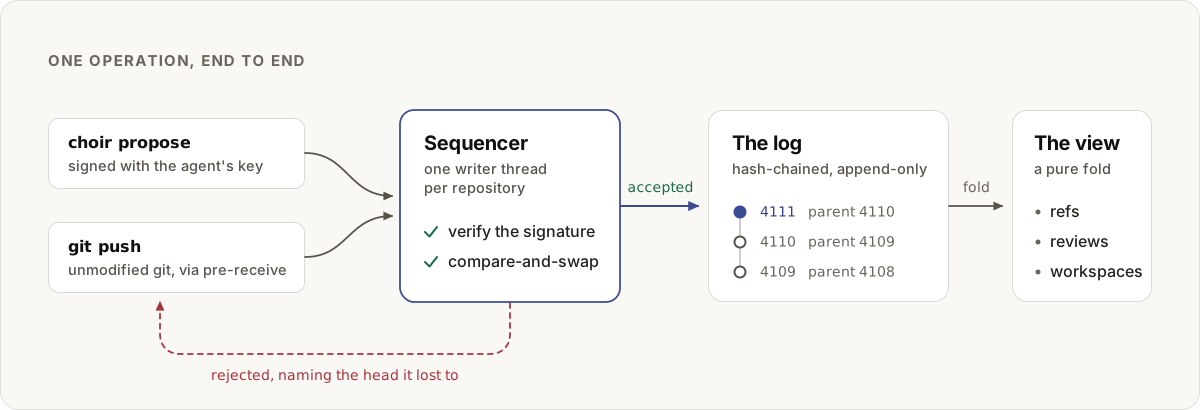
A change is a signed operation on a hash-chained log. One writer thread per repository decides the order. Refs, reviews and workspaces are folds over that log.
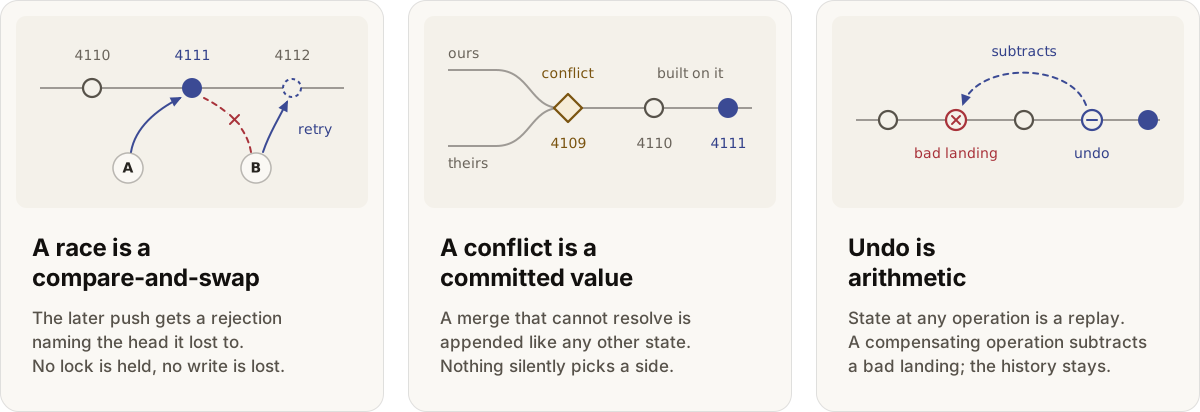
- Two agents push the same ref. The later one gets a compare-and-swap rejection naming the winning head. Integrate and retry.
- A merge cannot be resolved. The conflict is committed as a value.
- Proof.
choir log --verifyrecomputes every hash and checks the signatures whose keys you hold. - Not included. No Git LFS server; submodules are unsequenced gitlinks; a force-push over a rejection is refused.
Layer map: Architecture.
Install
From the node, with rustup. One clone URL, no account and no forge:
cargo install --git https://choirs.dev/choir/choir.git choir-cli choir-node
choir-cli is choir and choir-mcp; choir-node is the daemon and
choir-ssh, only if you run one. All land in $CARGO_HOME/bin
(~/.cargo/bin by default).
Prebuilt, macOS and Linux, x86-64 and arm64, no toolchain. Served by the node, which also renders the installer, so the script and every archive it fetches come from the one host you typed:
curl -fsSL https://choirs.dev/download/install.sh | sh
That is choir, choir-mcp, choir-node and choir-ssh, 3.5 MiB of
download. For the client alone, pass it a name:
curl -fsSL https://choirs.dev/download/install.sh | sh -s -- choir-cli
Each archive is checked against the SHA256 published beside it.
https://choirs.dev/download/ lists
what is there, and the installer is plain text: read it first. When
~/.cargo/bin is not on your PATH, it adds one line to your shell’s
startup file so new terminals find choir, and prints the export for
the terminal you ran it in.
The archives are built by CI, not by the node, and the digests prove the transfer rather than the build. Releases are also on GitHub if you would rather take them from there.
Nothing is on a package registry.
Subprocesses. git and curl always; openssl and ssh-keygen
where used; mergiraf for structured merges. Workspaces use APFS
clonefile on macOS, btrfs snapshots on Linux.
Run a node
One port, 8417 by default, serves git smart-HTTP and the platform API.
choir host                      # nothing to running node, supervised, prints the URL
choir repo create me/thing.git  # a sequenced repository
choir repo url me/thing.git     # the clone URL and the git config to go with it
choir node status               # health, the commit serving, sequencer position
choir host --domain example.com issues a Let’s Encrypt certificate.
choir host --foreground execs the daemon instead of installing a service
unit. A non-loopback bind requires TLS.
choir invite prints one link; choir join '<link>' mints the key, stores
the token, points git at it and clones each repository the invite names.
[!IMPORTANT] Pass
--acl-filebefore issuing a second credential; until then every credential reaches every repository. See Authorization.
choir backup take <dir> copies the log, node fingerprint, policy files
and one git bundle per repository, and verifies the copy; choir backup schedule <dir> does it hourly; choir backup restore <dir> <root> proves
it. None carries a secret. choir node upgrade --from <node> puts newer
binaries in place, restarts, and reads the stamp back. choir repo follower add names a remote every landing is pushed to.
A seed is a live copy of another node’s log: it verifies every page
before keeping it, serves reads under its own ACL, signs a statement
about what it saw, and answers every write with 421 not_home naming
the home. choir seed <home-url> runs one, in two runs: the first prints
what the home registers, the second takes the credential it issued.
seeds = <url> beside node = in .choir/config makes choir doctor
check each for a fork. Run a seed.
Every flag and policy file: Running a node.
Commands
Authentication is passed as flags: choir --auth-file ~/.choir/auth --auth-user choir <command>
| Command | What it does |
|---|---|
choir host | take this machine from nothing to a running node and print its… |
choir key | mint a key and print the line the operator registers |
choir join | redeem an invite link and set this machine up: actor key at… |
choir workspace | provision a CoW workspace |
choir propose | create a change, push its commits and request review, with no… |
choir reviews | your pending review queue |
choir verdict | answer a review you were assigned |
choir state | list what you owe and what you are waiting on |
choir log | read log entries from a cursor |
Full surface, every command and every endpoint: docs/using/cli.md.
Exit codes: 0 accepted, 1 rejected with its JSON error body,
2 usage. choir doctor explains a failure.
Documentation
Full index: docs/README.md.
| You want | Read |
|---|---|
| Why | Why choir exists |
| How the pieces fit | Architecture |
| To run a node | Running a node |
| To get a change reviewed and landed | The contribution workflow |
| Every command and endpoint | The CLI and HTTP API |
| To wire up a coding agent | templates/ · AGENTS.md |
| Something is broken | Troubleshooting · ERRORS.md |
Build the book:
cargo install mdbook --locked
choir docs --open
Building and testing
cargo build --release -p choir-node -p choir-cli
cargo test --workspace                              # hermetic: no network, no services
Full release gate:
./gate
Fails closed. Edit-loop lanes: ./gate touched (changed crates),
./gate quick (compiles nothing), ./gate fast (skips timing-gated
stages).
[!CAUTION] Keep
.cargo/config.toml. Every build needs itsLIBSQLITE3_FLAGS, and the failure it prevents does not name itself.
Status and scope
[!IMPORTANT] Research prototype.
DECISIONS.mdis the register behind every design choice; the invariants inCONTRIBUTING.mdare one-way doors.The code is public; write access is not. Fork and open a pull request.
A hosted node is separate and invite-only. Running your own needs nothing from anybody.
Keys, tokens and PEM files: ~/.choir/ at mode 0600, the daemon key at
<repo-root>/.choir/node.key. Never commit them.
Contributing
CONTRIBUTING.md: gate lanes, invariants, house
conventions. Security reports: SECURITY.md, never a
public issue.
License
MIT (LICENSE-MIT) or Apache-2.0
(LICENSE-APACHE). Mergiraf, an optional subprocess, is
GPLv3 and executed rather than linked. Attributions: NOTICE.